Will your next chair fit the desk you use every day, or only look good in a product photo? In a small home office, that question matters more than brand names or cushioning. The best ergonomic chair is the one that clears a narrow desk edge, fits your body, and still lets your feet rest flat or onto a footrest when the desk height is fixed, which is how California and Canadian ergonomics guidance frame the problem (California ergonomics workstation guide, Canadian office ergonomics purchasing guide). That means the right shortlist is less about hype and more about fit, adjustability, and how much room the chair steals from the room.
I’ve kept this list focused on compact home offices, shared rooms, and mixed-height households. The picks below range from simple budget models to premium chairs, but each one earns its place by behaving well under a desk, not just by sounding ergonomic on paper.
Table of Contents
- 1. IKEA Markus
- 2. Branch Ergonomic Chair
- 3. Steelcase Series 1
- 4. Humanscale Diffrient World
- 5. Haworth Fern
- 6. Herman Miller Aeron
- 7. Steelcase Gesture
- Top 7 Ergonomic Chairs Comparison
- Matching the Right Chair to Your Budget and Room
1. IKEA Markus
The IKEA Markus stays on a lot of shortlists for a reason. It gives you a tall back, mesh for breathability, and a simple set of controls that are easy to understand on day one. For a small room, that matters, because complicated chairs often end up mis-set and never corrected.
Where it works best is with a fixed desk and a user who doesn’t need deep fine-tuning. The height-adjustable seat, tilt lock, and tilt tension adjustment cover the basics, and the long back can feel reassuring in a tight room (IKEA Markus). Where it falls short is just as clear, since the arms are fixed and there’s no seat-depth adjustment. Petite users are the ones most likely to notice that quickly, especially if the desk is shallow.
Practical rule: if your feet don’t land flat after you set the seat height, add a footrest before you judge the chair.
Why it fits a small home office
The Markus is a good starter chair when the room is tight and the budget is tighter. It doesn’t demand a lot of floor space visually, and it won’t swallow the room the way some premium task chairs do. The trade-off is fit. Medium and taller users are more likely to settle into it comfortably, while shorter users may feel pushed forward unless they use support under their feet.
It’s a reasonable buy if you want a no-drama chair and you’re willing to supplement it. A separate lumbar cushion or a footrest can make it more workable in a compact setup. That’s not glamorous, but in a small room, the chair that cooperates with the desk often beats the chair with the best marketing copy.
2. Branch Ergonomic Chair
The Branch Ergonomic Chair is the clearest value play in this group for users who want real adjustability without jumping into premium pricing. It has 8 points of adjustment, including 3D arms, seat depth, and a tilt limiter, which is exactly the kind of range a compact desk needs when you’re trying to avoid shoulder bumps and wrist crowding (Branch Ergonomic Chair). The double-layer mesh back and firmer lumbar feel make it more supportive than plush.
The big win here is clearance. Removable arms help the chair tuck under tighter desk edges, and the compact side profile makes it easier to live with in a shared room. If you share a work area with a partner, child, or roommate, that matters as much as the backrest. A chair can be technically ergonomic and still be annoying if it won’t park under the desk cleanly.
What the Branch gets right and where it feels firm
The Branch does not try to be soft first. It tries to be adjustable first. That means the seat and back feel firmer than a cushioned lounge-style chair, but the upside is more predictable support over a workday.
For petite and mid-height users, it’s one of the better midrange fits because the depth adjustment gives you room to avoid sliding forward. Taller users may still want to check seat length carefully, since adjustability only helps if the chair can open up enough for long thighs and a narrow desk. If you want a chair that behaves like a proper workstation tool, this one makes sense.
3. Steelcase Series 1
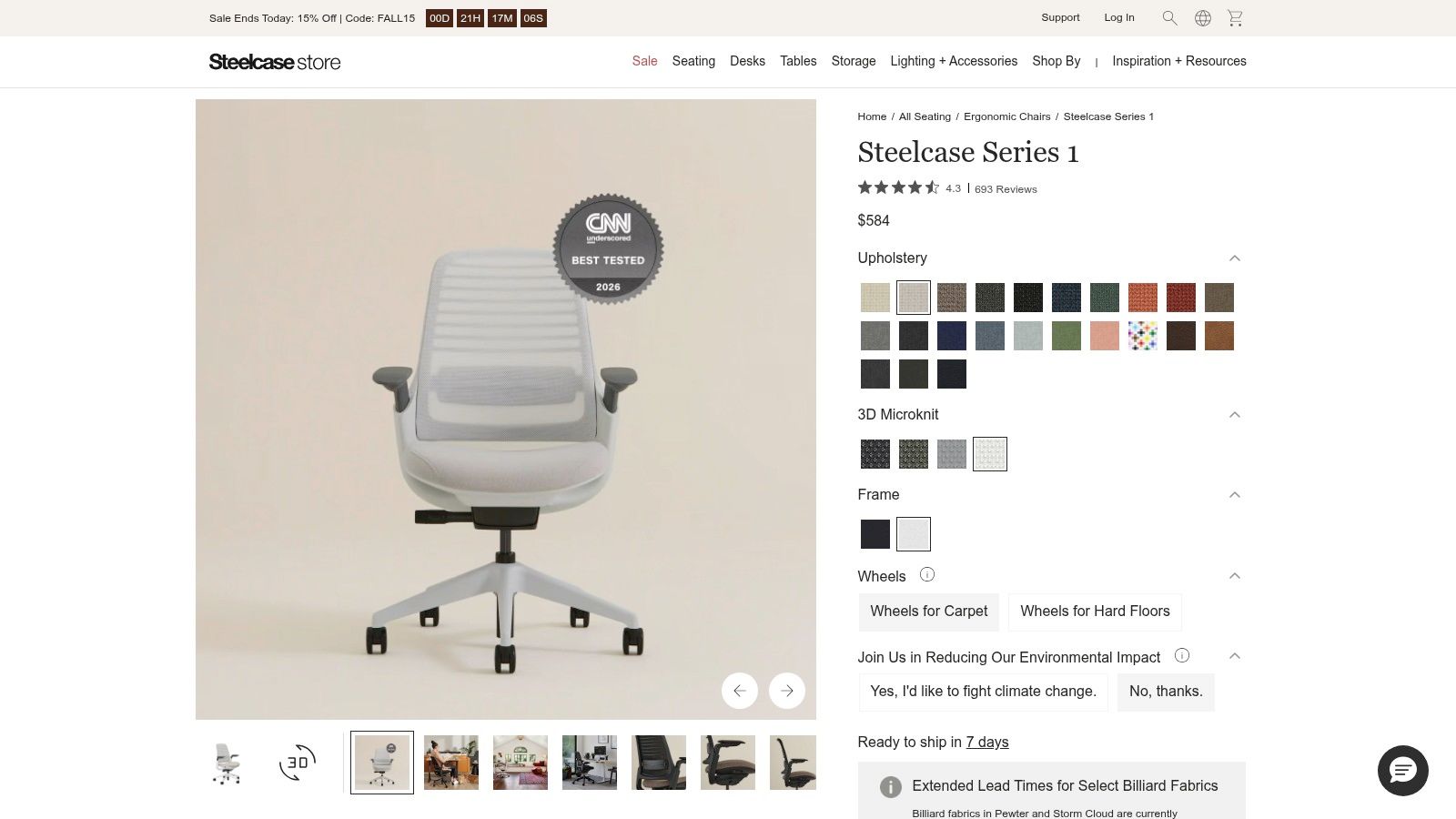
The Steelcase Series 1 is a compact, serious task chair that does a lot with a relatively small footprint. Its LiveBack flexor backrest, height-adjustable lumbar, adjustable seat depth, and adjustable arms make it one of the better fits for people who want a chair that can adapt to them rather than asking them to adapt to it (Steelcase Series 1). In a small home office, that adaptability matters more than a flashy silhouette.
The Series 1 is easy to recommend when the chair has to serve more than one task. It works for typing, reading, and casual video calls without feeling overbuilt. It also stays visually smaller than many premium executive-style chairs, which helps in a shared room or apartment office where every object competes for attention.
A compact chair should make the desk feel bigger, not turn the room into a furniture showroom.
A smart mid-tier choice for mixed body sizes
The best thing about this chair is how it handles fit. Adjustable seat depth helps petite users avoid pressure behind the knees, while the back and arm adjustments give taller users room to settle in without forcing a hunched posture. That makes it one of the safer buys when you don’t know exactly who will use the chair most of the time.
The downside is comfort style, not function. It’s not a plush sit. It’s more disciplined than luxurious, which some people prefer and others won’t. If you want a chair that earns its footprint through fit and control, rather than softness, the Series 1 lands in a very practical place.
4. Humanscale Diffrient World
The Humanscale Diffrient World is the chair for people who hate fiddling with knobs. Its weight-sensitive recline removes the need for a manual back-tension control, while the tri-panel Form-Sensing Mesh gives the back a clean, compact look that suits a shared room or a minimalist desk area (Humanscale Diffrient World). It feels especially appropriate when the office is also part of a living space.
That simplicity is the whole point. If you want a chair that self-adjusts quickly and doesn’t look heavy, this is one of the strongest options. The arms are integrated into the back and height adjustable, so you get enough control to stay comfortable without turning the chair into a project. For users who switch between calls, typing, and quick tasks, the low-maintenance design is a real advantage.
Best for shared spaces and low-maintenance use
The World Task Chair is not about deep customization. It’s about getting close to the right position fast and leaving it there. That works well when the same chair is used by more than one person, since fewer controls mean fewer wrong settings.
The trade-off is obvious. If you want a soft, heavily tuned chair with lots of manual tweaks, this won’t satisfy you. The mesh seat also feels firmer than cushioned foam, so people who want a softer landing should look elsewhere. But if your priority is a light visual footprint and an easy chair that disappears into the room, this one makes a strong case.
5. Haworth Fern
The Haworth Fern is the chair on this list that feels most like it was designed for movement, not stillness. Its Wave Suspension back flexes with posture changes, and the overall shape stays visually slim even when it’s fully set up for work (Haworth Fern). In a compact room, that matters because a bulky chair can dominate the space even when nobody is sitting in it.
What stands out is the way the back spreads support across more of the spine without turning into a rigid shell. That makes it easier to shift positions during the day. The chair also comes with adjustable lumbar and seat depth options, so it can be dialed in for different body types rather than locked into one posture.
A premium chair that still respects a small room
The Fern is a good fit if you want something softer and more refined than a basic mesh chair. The seat has a more forgiving feel than many firm task chairs, and the recline is balanced enough for long sessions without feeling twitchy.
The trade-off is price variability and the way premium materials can push the cost up fast. You’re paying for feel, finish, and a supportive back that doesn’t look industrial. If your room doubles as a guest room or living space, the Fern has enough visual restraint to belong there. If you need every dollar to go into function first, the value picks above make more sense.
6. Herman Miller Aeron
The Herman Miller Aeron is still the clearest example of a chair built around fit, not just looks. Its A/B/C frame sizes matter because one frame can feel cramped for one user and oversized for another, and that mismatch shows up fast at a compact desk (Herman Miller Aeron). The right size helps with knee clearance, keeps the chair from crowding a shallow desk, and avoids wasted room in a small office.
The seat and back use 8Z Pellicle mesh with zoned tension. There is also PostureFit SL support for the lower back. The feel is breathable and controlled, not soft and sinky. That works well in warm apartments, during long computer sessions, and for users who want a precise fit instead of a cushioned sit.
The Aeron makes the most sense when fit matters more than softness and the chair has to hold up through years of daily use.
When size matching matters more than softness
Tall and petite users both benefit from a chair line that gives a real size choice instead of forcing one frame to do everything. That lines up with Canadian occupational-ergonomics guidance, which says the chair should match the worker’s body dimensions, workstation, and tasks, not just look ergonomic in a product photo (Canadian occupational-ergonomics guidance).
The trade-off is clear. The Aeron is not the softest chair here, and it will not suit someone who wants a heavily cushioned seat. It is a better pick if you want breathable support, a proven size system, and a chair that can work in a small office without crowding the room.
7. Steelcase Gesture
The Steelcase Gesture is the best fit here for people who work mostly on laptops, tablets, or mixed-device setups. Its 360-degree arm motion is the standout feature, because narrow desks often force awkward arm positions and fixed arms get in the way fast (Steelcase Gesture). When the arms can move where your hands need them, the whole workstation feels less cramped.
The synchronous seat and back recline helps too, especially if you move between typing, reading, and call-heavy work. The chair is premium, and it feels premium. But in a small room, the key question is whether the arms can tuck and clear the desk edge. On that front, it’s one of the best chairs on this list.
The best arm solution for narrow desks
The Gesture’s biggest advantage is not the backrest, it’s the way the arms behave. If you’ve ever had chair arms slam into a shallow desk or prevent you from sliding close enough to type comfortably, this chair solves that problem better than most. That makes it especially useful in compact home offices where laptop work is common.
The downside is visual bulk. The chair can look thick in minimalist setups, and the price puts it firmly in the premium tier. Still, if your desk is narrow and your work is device-heavy, the arm system may be worth more than a softer seat or a flashier finish.
Top 7 Ergonomic Chairs Comparison
| Model | 🔄 Complexity (adjustments) | ⚡ Resources & setup (cost / delivery / footprint) | ⭐ Expected outcomes (comfort / support) | 📊 Ideal use cases (results / impact) | 💡 Key advantages / tips |
|---|---|---|---|---|---|
| IKEA Markus | Low, tilt lock, tension, height; fixed arms | Very low cost, widely available in Canada, easy returns; taller high-back footprint | Solid basic support for medium/taller users; may need external lumbar or footrest for petite users | Budget starter, small rooms, occasional use | Affordable, stable build, 10‑yr limited warranty |
| Branch Ergonomic Chair | Medium, 8-way adjustability incl. 3D arms & seat depth | Mid price, fast shipping, easy assembly; compact side-to-side profile | Strong adjustability and supportive lumbar; firmer seat feel | Budget ergonomic choice, compact desks, quick delivery needs | Very adjustable for price; firmer mesh+foam seat |
| Steelcase Series 1 | Medium, LiveBack, adjustable seat depth and arms | Mid price, space-efficient and lighter than premium chairs | Good ergonomics per dollar; less plush than high-end seats | Students, small home offices, value-focused buyers | Strong ergonomics/value, narrow overall width |
| Humanscale Diffrient World | Low, weight-sensitive recline, minimal manual controls | Mid‑to‑high cost, lightweight and low‑maintenance; compact footprint | Simple, breathable, self‑adjusting support; less fine tuning | Shared spaces, users wanting low maintenance and breathability | Tri-panel mesh, ideal where easy use > manual tuning |
| Haworth Fern | Medium, Wave Suspension, adjustable lumbar & seat depth | Premium pricing (varies with config), multiple quick-ship options | Plush seat, balanced recline, even spinal support for long sessions | Long-duration work, users wanting movement-friendly support | Wave Suspension spreads pressure, highly comfortable but pricier |
| Herman Miller Aeron (A/B/C) | Medium‑High, size-specific frames, PostureFit SL and many options | High cost when configured; breathable mesh; strong resale & parts ecosystem | Excellent fit when sized; zoned mesh for pressure relief; firm seat feel | Long-term ownership, warm apartments, users needing size match | Size system for proper fit, extensive aftermarket/config options |
| Steelcase Gesture | High, highly adjustable 360° arms, synchronous recline, many options | Premium price, robust build; arms tuck for narrow desks but visually bulkier | Class-leading arm positioning and all-day support for device work | Heavy laptop/tablet users, precise arm positioning in tight setups | 360° arm motion, excellent build/warranty, ideal for multi-device use |
Matching the Right Chair to Your Budget and Room
Start with the desk, not the chair. Measure the clearance between the desk edge and the wall, then check how far the chair has to pull out before you can stand up cleanly. That tells you whether fixed arms will be a problem, whether you need removable arms, and how much footprint the chair can steal from the room.
After that, match the chair to your body, not the product category. California’s ergonomics guidance is blunt about the basics, feet flat on the floor, knees level with or slightly lower than the hips, lumbar support set to the lower-back curve, and armrests keeping the shoulders relaxed (California ergonomics workstation guide). Canadian guidance makes the same point in different words, a chair is ergonomic only when it suits the worker’s dimensions and workstation (Canadian office ergonomics purchasing guide). That’s why the right answer can be a budget chair with a footrest, or a premium chair with better seat depth and arm clearance.
If you’re working in a small home office, choose the lowest price tier that gives you the adjustments you’ll use. For some people that’s a simple starter chair. For others it’s a midrange model with seat depth and better arms. The wrong chair is the one that blocks the desk, crowds the room, or leaves your feet and shoulders fighting the setup all day.
Deskbound is built for this kind of decision. It focuses on compact home office problems, real trade-offs, and upgrades that earn their footprint. If you want more small-space chair guidance, setup advice, and practical reviews that cut through showroom thinking, visit Deskbound and use the small-desk advice to match your chair to the room you have.
Made with Outrank