
Plan for at least 30 inches (76 cm) of usable depth when a monitor and keyboard share the desktop, and treat 24 inches (61 cm) as workable only with a keyboard tray or monitor arm.
A desk sold as deep enough can still crowd you. The rear cable channel, a raised shelf, a monitor base, and the front lip all eat into the number printed on the box. What remains is the usable depth, and that figure decides whether the screen sits at a comfortable distance or ends up too close. Hybrid work makes the choice harder, because a laptop-only surface often grows into a stand, an external keyboard, a webcam, and a second screen. Size the desk for the gear you will add, not only the gear sitting there today.
Table of Contents
- Desk Depth by Setup at a Glance
- Why 30 Inches Is the Working Standard
- How to Measure Usable Depth Before You Buy
- Dual Monitors and Arm Placement
- Fitting a Full Workstation Into a Small Room
- Plan for Hybrid Work and Changing Equipment
- Choose Your Depth Before You Order
Desk Depth by Setup at a Glance
For a monitor and keyboard on the desktop, plan for at least 30 inches (76 cm) of clear work surface. Subtract the cable trough, any raised shelf, and the footprint of the monitor base before you trust the advertised depth. The table covers six setups. The minimum is the shallowest surface that still works. The recommended depth is what to aim for when the room allows it.
| Setup | Minimum usable depth | Recommended depth | Notes |
|---|---|---|---|
| Laptop on elevated stand with external keyboard | 24 in (61 cm) | 24 in (61 cm) | Suits short sessions; check screen distance and forearm support |
| Laptop with external keyboard on a keyboard tray | 24 in (61 cm) | 30 in (76 cm) | Tray moves the keyboard off the main surface and frees the front zone |
| Single monitor with keyboard and mouse on the desktop | 30 in (76 cm) | 30 in (76 cm) | Default benchmark for most home offices |
| Dual monitors on stands | 30 in (76 cm) | 30 in (76 cm) | Stands push screens forward and consume the front zone |
| Dual monitors on arms | 24 in (61 cm) | 24 in (61 cm) | Arms clamp to the rear edge and free the desktop for keyboard and writing |
| Writing beside keyboard or paper work | 30 in (76 cm) | 30 in (76 cm) | Needs clear front space for notebooks beside the keyboard |
The single-monitor row is easy to recognise as your own desk. The 24-inch (61 cm) rows only hold up with a tray or an arm. Stand-based setups need the full 30 inches so the screens are not shoved into the keyboard zone.
Practical rule: Match the row to the gear you have now, or the gear you expect within a couple of years, then check that depth against the room before you shop.
Why 30 Inches Is the Working Standard
A standard computer desk should give you real working room, not just a deep-looking carton. The University of British Columbia ergonomics guidelines treat 30 inches (76 cm) of usable depth as the preferred minimum for a standard computer workstation in Canada. That surface has to hold the monitor, the keyboard, and the other materials you use.
Overall depth versus usable depth
A rear cable channel, a hutch, a monitor stand, or a front overhang can consume several centimetres of an advertised 30-inch top. You work on the strip left after those features. If that leftover cannot place the keyboard and the screen in front of you at a comfortable viewing distance, the desk is shallower than the label.
Hybrid setups eat the same rear zone. A dock, a second screen, or a stand added later sits beside the cable channel and the stand foot. Choose depth for that equipment, or the keyboard slides onto the front edge.
When 24 inches still works
I recommend a 24-inch desk only when a keyboard tray is available. Moving the keyboard below the main surface frees the front zone and lets the monitor sit farther back. Without a tray, keyboard and screen share one strip, the screen sits too close, and your wrists reach for a board with nowhere to sit.
On a 24-inch studio corner desk, a monitor plus keyboard runs out of room quickly. The mouse leaves the edge. A tray under the front rail is the fix when the room cannot take a wider top.
Large displays, writing beside the keyboard, and dual monitors all push the requirement toward 30 inches. Treat 24 inches as a lower boundary for a small apartment, not as the default.
How to Measure Usable Depth Before You Buy
Measure the surface you can use, not the figure on the carton. The Workers’ Compensation Board of Nova Scotia office guide defines usable depth as the clear computer-work surface, excluding areas blocked by counters or other unusable sections, and it sets a viewing distance of at least 20 inches (50 cm) from the eyes.
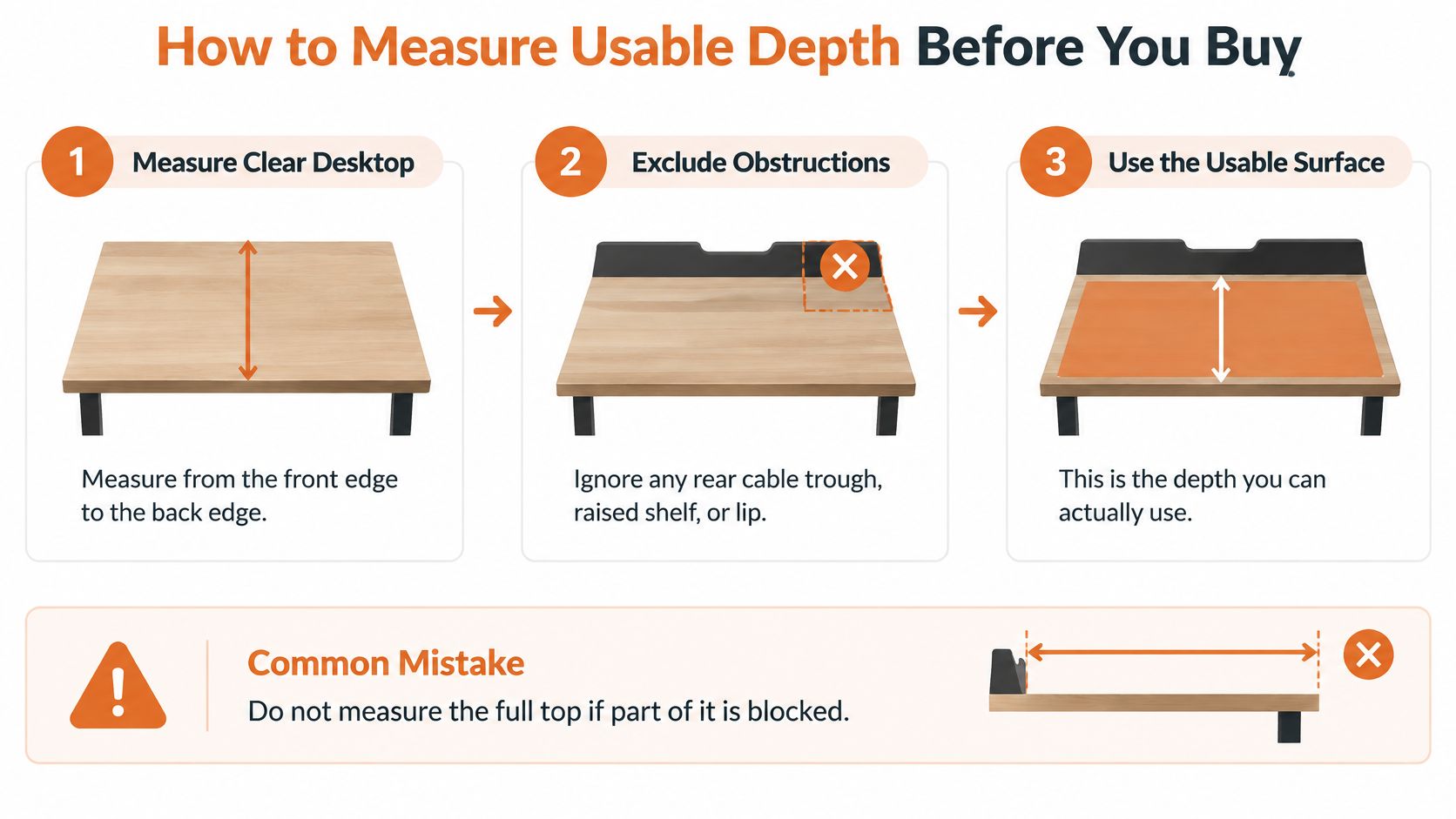
- Measure the clear desktop. Run a tape from the front working edge to the back of the open surface, and stop where a trough, shelf, or lip begins. That length is the depth you can use. The common mistake is copying the advertised depth off the box.
- Mark the monitor base. Trace the stand, including any front overhang, on the desktop. A wide foot can steal the middle of a shallow top even when the panel itself looks slim. Forgetting that overhang is the usual miss.
- Reserve the front zone. Leave the keyboard’s own depth plus a palm’s width of wrist room, and keep the mouse on the same plane. If the monitor base lands in that strip, the input posture collapses. Do not let the screen take the front zone.
- Check screen distance. With you seated, the screen should be at least 20 inches (50 cm) from your eyes. If the stand forces it closer, the desk is too shallow or you need a rear-mounted arm. Accepting a closer screen is the mistake that shows up as neck strain later.
- Sit as you normally would. Forearms should rest without a reach, and the top of the screen should sit near eye level. Testing the layout while you stand tells you nothing about the chair height you will use.
If the clear depth left after these checks is under 30 inches, plan a keyboard tray or a monitor arm before you buy the desk. A shallow top can still stay tidy if small items leave the surface. A compact desk organizer tray keeps pens and dongles off the front zone the keyboard needs.
Dual Monitors and Arm Placement
Two screens change the depth maths because each stand pushes its panel forward and eats the strip the keyboard needs.
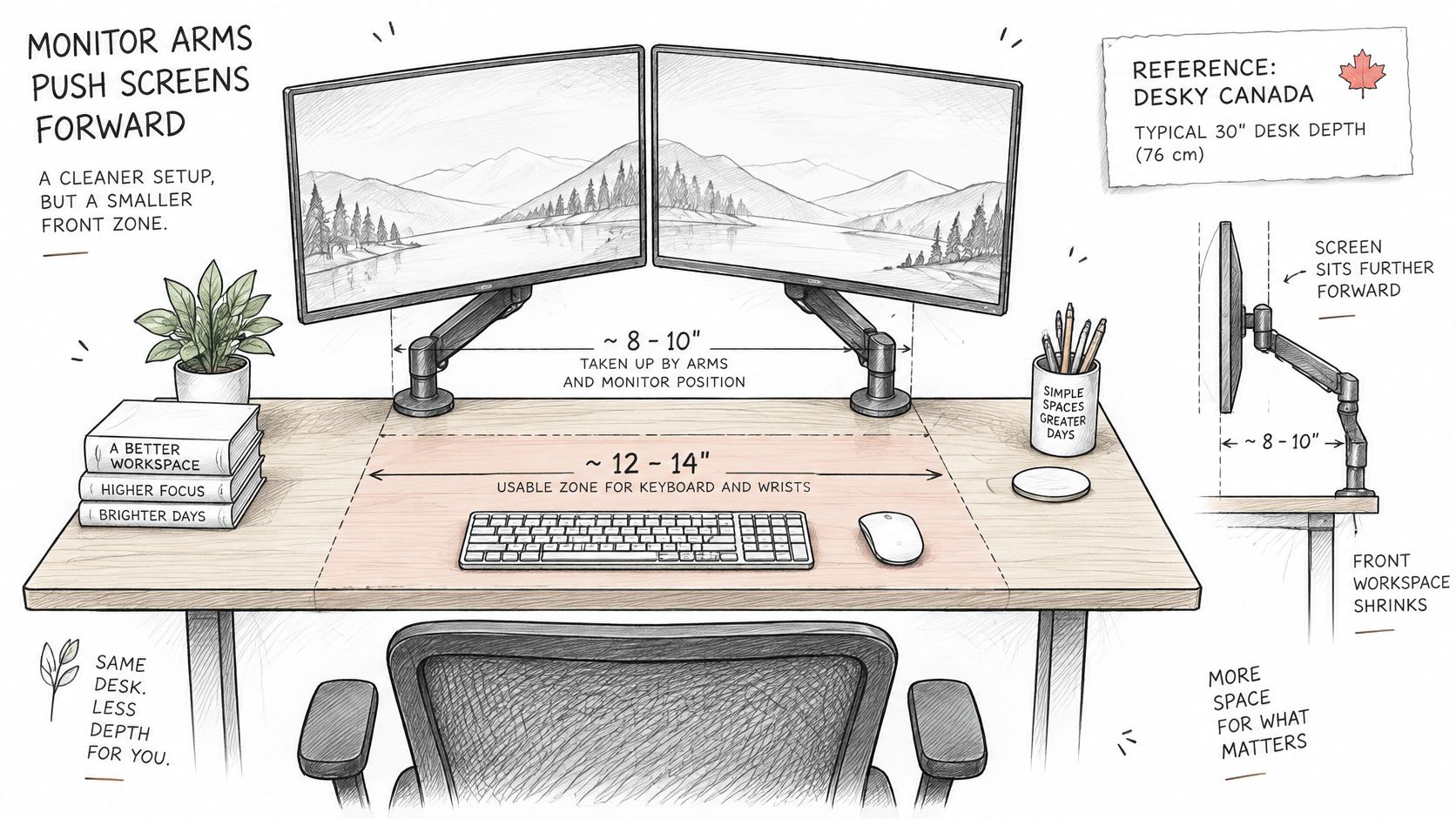
In 2024, Desky Canada reported that its 29.5-inch (75 cm) desk depth places monitors about 20–22 inches from the front edge when they sit on stands, while a 24-inch (61 cm) desk works best with monitor arms. That vendor figure is one product line, not a national standard, but the pattern is useful. Stands on a desk near 30 inches leave a front band roughly in that 20 to 22 inch range. Arms clamp at the rear and lift the panels, so a 24-inch top can carry two displays.
| Mounting method | Desk depth | Monitor distance from front edge | Trade-off |
|---|---|---|---|
| Monitor stands | 29.5 in (75 cm) | 20–22 in | Cheaper and no clamp, but needs the deeper desk |
| Monitor arms | 24 in (61 cm) | Set by arm reach, farther back than a stand | Clamps to the rear edge, needs a thick top and a load-rated edge |
Stands cost less and need no clamp. They also demand the deeper desk, or the screens land on top of the keyboard. Arms free the desktop for a keyboard and a notebook, but the top has to be thick enough for the clamp and strong enough at the rear edge to carry the load. Check the arm’s weight rating against both panels, not against one.
A renter with a 24-inch desk can add two monitors on arms and still keep a mouse pad. A writer who keeps one monitor on a stand, plus a notebook beside the keyboard, is better on a 30-inch top where the paper does not slide under the stand.
<iframe width=“100%” style=“aspect-ratio: 16 / 9;” src=“https://www.youtube.com/embed/-iv5Xp7MgdU” frameborder=“0” allow=“autoplay; encrypted-media” allowfullscreen></iframe>
Before you order either mount, confirm three things. The clamp must match the top thickness. The rated load must cover both screens. Seated, each screen should still sit at least 20 inches from your eyes.
Fitting a Full Workstation Into a Small Room
The desktop is only one slice of the footprint. The Canadian Centre for Occupational Health and Safety lists a basic workstation of about 107–132 centimetres wide by 152–183 centimetres deep, and it treats those figures as planning ranges rather than a single mandatory standard. A desk about 76 centimetres deep does not mean the room only needs 76 centimetres. The chair, the space to roll it back, and the path behind it all sit outside that measurement.
Clearance the cramped desk loses first
The same guidance points to about 43 centimetres of horizontal knee space and 60 centimetres of toe space. A modesty panel, a CPU tower, or a power bar on the floor is usually what steals those clearances. You feel it as knees against a rail long before you notice the desktop looks short.
Save floor space in this order, from the move that reclaims the most room to the one that only tidies:
- Keyboard tray: Pulls the board off the top and can make a 24-inch surface usable without a deeper desk.
- Monitor arm: Clears bases off the surface so the front zone returns to the keyboard and a notebook.
- Rear-routed cables: Stops a tangle from pushing the desk away from the wall.
- Corner or wall-mounted top: Uses two walls and leaves the middle of the room for the chair path.
- Shelf above the desk: Stores books and a printer that would otherwise demand extra depth.
Say the desk sits in a bedroom corner. You pull the chair out, the door swings across that path, and a radiator sits behind the chair. Measure with all three in place, not with the room empty. Space-saving upgrades for a small desk are worth trying before you commit to a larger top the room cannot hold.
Mark the full footprint on the floor with tape, chair included, before you order.
Plan for Hybrid Work and Changing Equipment
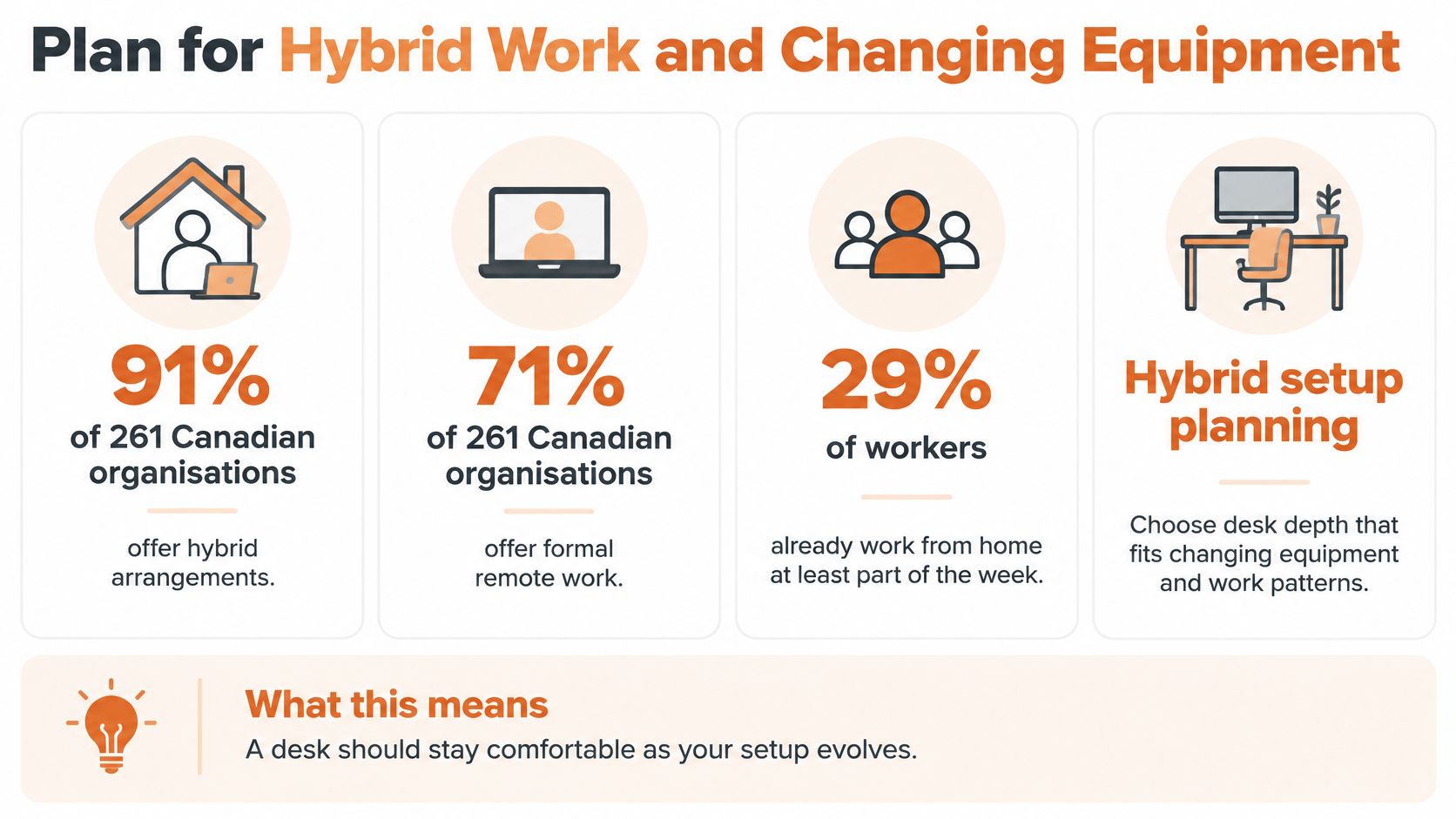
A desk bought for one laptop rarely stays that desk. Hybrid weeks add a second screen, a dock, and a notebook that were not there on day one. Each piece eats usable depth even though the carton measurement never changes.
A 2025 survey of 261 Canadian organizations found that 91% offer hybrid arrangements and 71% offer formal remote work. Plenty of workers now split time between home and an office, so the home surface has to take gear that arrives and leaves.
Depth by the setup you will grow into
Plan for the kit you will add over the next couple of years. A stand, an external keyboard, a webcam, a second monitor, a notebook, and a short stack of paper each claim front or side space. Two years is a fair horizon. Buying enough depth now costs less than swapping the desk after the first external screen no longer fits.
Usable depth is smaller than the advertised figure. A rear cable channel, a monitor stand, the gap to the wall, and the front overhang all shrink the strip that holds the work. I treat 30 inches as a benchmark for a station that may grow, not a rule for every room. If a second monitor is only occasional, a shallower top can still work once the screen is off its base.
Call gear and storage that live off the desktop belong in fixes for the half of your setup that isn’t the desk. Leave that half out of the depth math, or the top gets sized for clutter instead of the keyboard and screens.
Choose Your Depth Before You Order
Pick the depth by how you work, then stop second-guessing the carton.
A laptop-only user in a studio can work at 24 inches on a raised stand with an external keyboard. A main workstation with a monitor and keyboard on the desktop should have 30 inches of usable depth. Anyone running dual screens, or a hybrid setup that may grow, should choose 30 inches or a 24-inch desk with arms.
Do this check in order before you pay. Measure the clear desktop with the steps above. Confirm the screen can sit at least 20 inches from your eyes while you are seated. Tape the full footprint on the floor, including the chair pulled out and the door swing.
If the desk you already own falls short, add a keyboard tray or a monitor arm before you buy a replacement. We review desk organizer trays for build quality, capacity, and footprint, and our cable guides cover cable trays, raceways, and velcro ties for hiding cables under a desk so a rear channel does not steal the depth you just measured.
Decide from the usable depth, not the number on the box.
Deskbound publishes practical reviews and setup guides for compact home offices, including how deep a desk should be once cable channels, stands, and later gear are counted. If you are fitting a workstation into a small room, start with our buying notes and space-saving upgrades, then visit Deskbound for the next piece of the setup.