Canadian adults aged 18–64 report roughly four hours of work-related sedentary time per day on average. In traditionally desk-oriented jobs, that figure can reach 6.4 hours, compared with about 2.2 hours in more physically active occupations, according to a Canadian study of sedentary time at school and work. Those numbers make the case for interrupting long stretches of sitting, not for standing still all day.
A sit-stand desk can help make posture changes practical, but it doesn’t replace walking or other movement, and it isn’t a health guarantee. In a small home office, there’s another test before you buy: can the desk, screen, chair and cables all move safely within the room you have?
Table of Contents
- Why a Sit Stand Desk Is Really About Interrupting Sitting
- Electric, Manual and Converter Desks Explained
- The Workspace Envelope Test for Small Rooms
- Setting Height for Elbows, Monitor and Clearance
- How Much Standing Is Too Much for a Beginner
- Choosing the Right Sit Stand Desk for Your Space
- Maintenance and Safety Checks That Keep It Working
- Your First Week with a Sit Stand Desk
Why a Sit Stand Desk Is Really About Interrupting Sitting
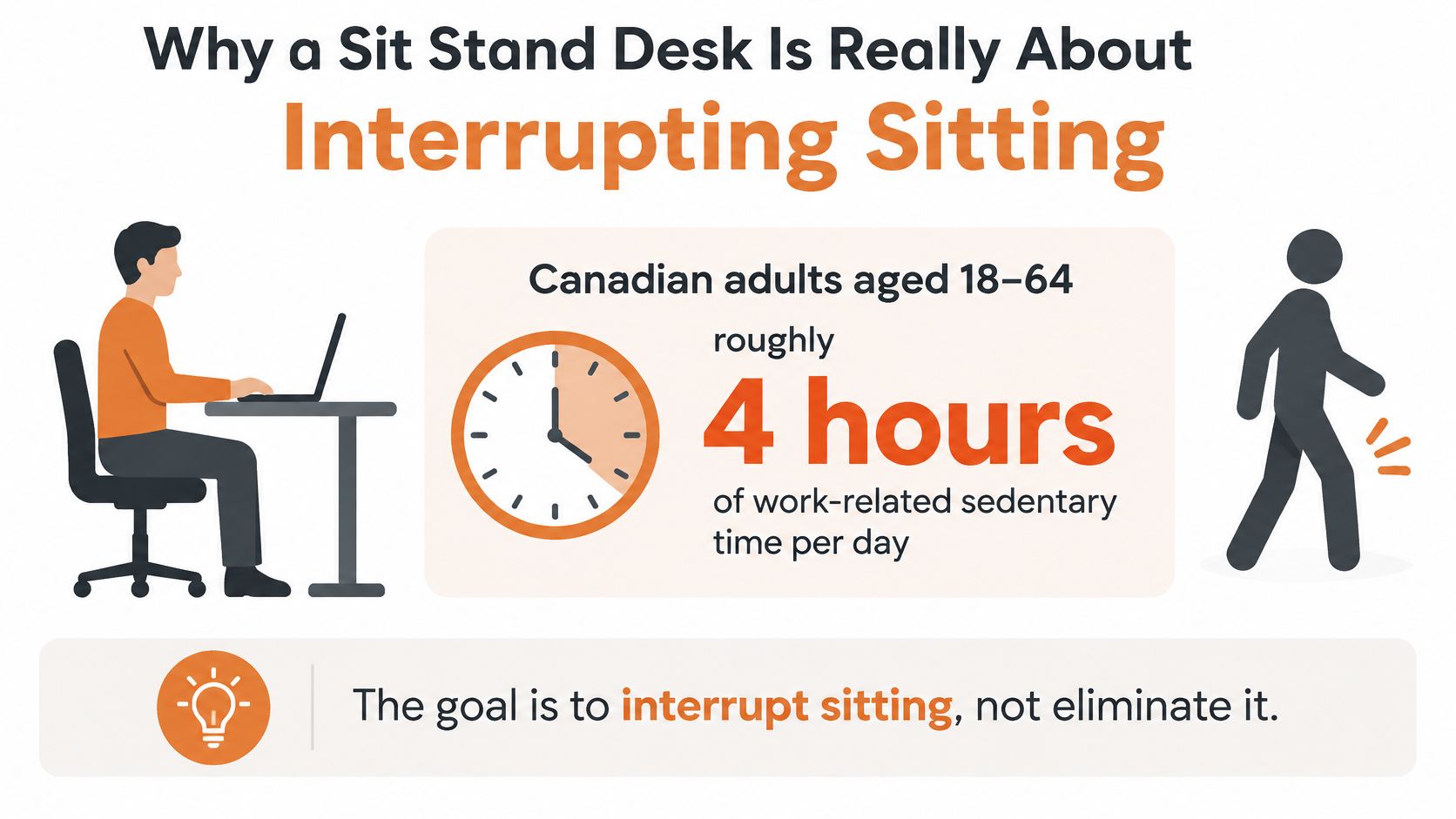
The useful question isn’t whether standing is healthier than sitting. It’s whether you can break up long periods in one posture without creating a new problem by standing still for too long. A sit-stand desk is best understood as a behaviour-change tool: it makes switching positions easier during computer work.
A major review summarised in Canadian reporting on sit-stand workstation research covered 34 studies involving nearly 3,400 workers. Compared with conventional seated desks, adjustable workstations reduced daily sitting by an average of approximately 84 to 116 minutes. The clearest measured effect was less time sitting at work, not proof of improved cardiometabolic health or a guarantee that users moved more overall.
That distinction matters in a small apartment, where it can be tempting to count standing time as exercise. Standing at a desk is still a largely stationary activity. Use the height adjustment to change posture, and make room in your routine for actual movement, such as walking or stretching.
The practical measure of success is less uninterrupted sitting, not the longest possible standing session.
The desk is most relevant if your work regularly involves long computer sessions. Office employees, remote workers, students and freelancers may all benefit from having a convenient way to change position. The Canadian figures show why desk-based work is a particular concern, but a desk won’t reduce sedentary time outside work by itself.
In compact rooms, usefulness also depends on fit. If the keyboard, monitor or cables can’t travel with the desk, you may avoid adjusting it. Treat the desk as part of a moving workstation, not as a tabletop with a motor.
Electric, Manual and Converter Desks Explained
A sit-stand desk can raise the entire work surface, or it can lift only the equipment placed on top of a fixed desk. That difference affects how easily you’ll switch positions and whether the setup fits a tight room.
Three ways to change height
Electric desks use a motor to raise and lower the desktop. A button or controller makes adjustments straightforward, which is useful if you want to change positions regularly. The trade-off is that the whole desktop travels, so you need to check for wall, shelf and cable clearance through its full range.
Manual desks use a crank or another hand-operated mechanism to move the work surface. They can be a sensible option when simplicity matters, but adjustment takes more effort. If changing height feels like a chore, you may do it less often.
Converters, sometimes called desk risers or toppers, sit on an existing fixed desk and raise the keyboard and display. They can preserve floor space and avoid replacing the desk, but the added structure takes up desktop area and may push the monitor towards a wall or shelf. Check whether the keyboard and screen both move to useful positions, rather than assuming any raised platform will suit your posture.
| Type | How Height Changes | Footprint Impact | Adjustment Effort | Best Fit |
|---|---|---|---|---|
| Electric desk | Motor raises or lowers the full desktop | Requires clearance for the desktop and anything attached to it | Low | Frequent changes and a dedicated desk footprint |
| Manual desk | Hand crank or other manual mechanism moves the desktop | Full desk footprint, with travel clearance to check | Higher | Users who don’t mind a more deliberate adjustment |
| Converter | Topper lifts the keyboard and display above a fixed desk | Uses existing floor space but occupies more desktop depth | Varies by design | A room where replacing the desk isn’t practical |
Match the mechanism to the room
In a shared room, an electric desk may be convenient for users who need regular height changes, but its travel path must stay clear for everyone. A converter can work where floor space is fixed and the existing desk is suitable, though it may crowd a shallow surface. A manual desk offers adjustment without a motor, but convenience depends on how willing you are to operate it during the day.
Before choosing a type, consider both the room and the habits you want to support. The easiest desk to adjust is only a good fit if its keyboard, screen and cables can move without hitting anything.
The Workspace Envelope Test for Small Rooms
A desk may fit on the floor and still fail once it rises. Before buying, check the full workspace envelope: the space needed by the desk and everything attached to it, at both working heights and throughout the movement between them.
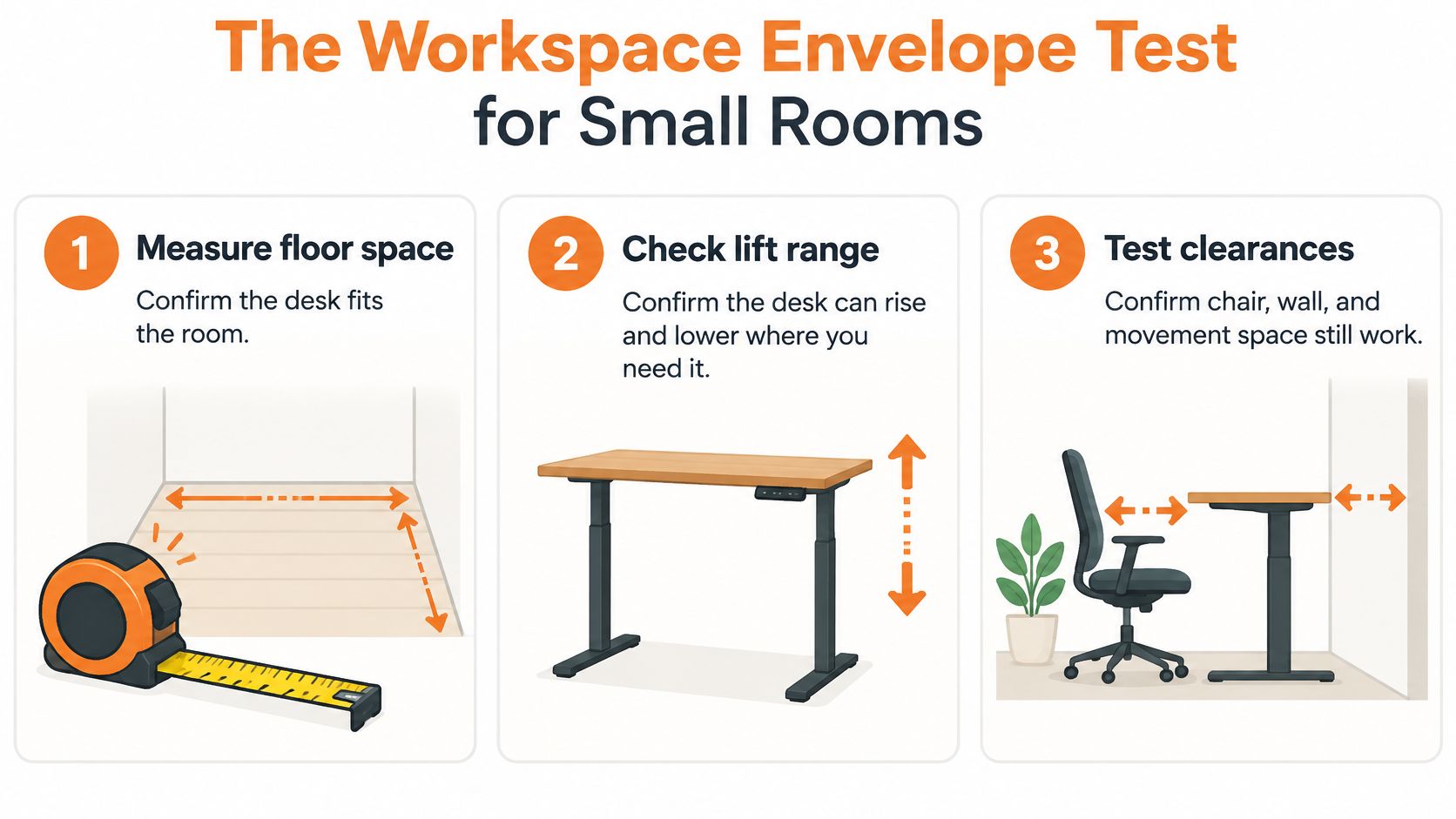
Measure the working area, not just the tabletop
Start with the seated setup. Sit in your usual position and check that the keyboard and mouse sit within comfortable reach, the chair can move freely, and your knees and feet have space beneath the desk. Then check the standing position: you should be able to use the keyboard without reaching or lifting your shoulders.
Next, trace the screen’s movement. A laptop sitting directly on a rising desktop may leave the display too low for standing. A monitor arm can help, but its rearward movement may bring the screen into a wall, shelf, window or a neighbouring workspace. Include any dock, lamp or other accessory that could obstruct the monitor or desk.
Check the whole travel path
Measure the clearance behind and above the desk, and look for anything the desktop might hit as it rises. Check that the chair can be pulled back when the desk is raised, especially if the room doubles as a living or sleeping area. Then inspect cable slack: power and display cables need enough length to move without pulling on ports, catching on furniture or dragging equipment.
Canadian CCOHS guidance on selecting sit-stand desks says the keyboard and mouse should stay aligned in both positions, the monitor should remain near eye level, and the platform should reach approximately standing elbow height. For a shared workstation, it also recommends an extended height range to accommodate multiple users.
A desk’s maximum height alone doesn’t prove that it will fit your body or room. The monitor, keyboard, chair and cables all need to work together at the top of the desk’s travel. Before purchase, use a tape measure to check seated reach, standing reach, monitor travel, cable slack, chair clearance and the desk’s full footprint when raised.
Setting Height for Elbows, Monitor and Clearance
A desk’s height range is useful only if it supports a comfortable position at both ends. Set the workstation by your body’s geometry, not by choosing a desk height that sounds right on paper.
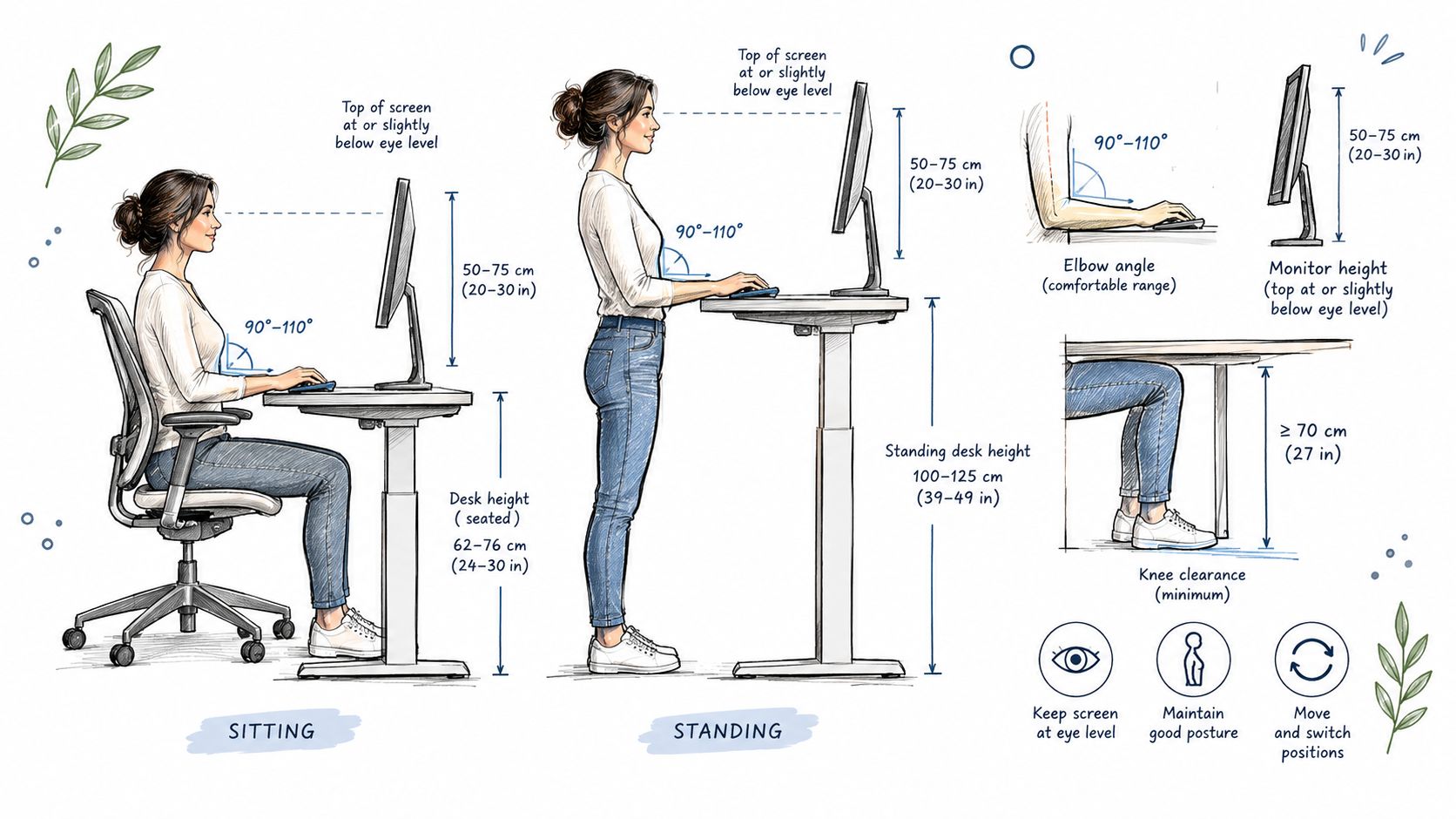
Set the work surface to your elbows
When standing, CCOHS guidance on standing workstation setup recommends placing the work surface approximately 5–10 cm below elbow level for precision work and 10–15 cm below elbow level for light work. These are practical reference points, not a substitute for checking how your shoulders and arms feel while typing.
For seated work, adjust the chair first. Then set the keyboard so your elbows sit near a neutral 90–110° angle, with your shoulders relaxed. Raise the desk to standing height afterwards, aiming to preserve that same arm posture. If your wrists bend sharply or your shoulders lift, the keyboard surface may be too high.
Keep the screen and your limbs clear
The monitor should sit at or slightly below eye level in both seated and standing positions. A screen that stays attached to a rising desktop may become too low when you stand, especially if you use a laptop without a separate display. A monitor arm or independently adjustable screen can make it easier to position the display correctly, but check its reach against the wall and shelf clearance you measured.
The desk also needs to leave room for your knees and feet while seated and allow you to shift position when standing. In a tight setup, watch for crossbars, drawers or a footrest that limits leg movement. Route cables so they don’t snag during adjustment, and confirm they have slack at the highest position.
A well-fitted setup isn’t one that reaches an impressive height. It’s one where your screen, keyboard and body remain in usable positions through the desk’s full travel.
How Much Standing Is Too Much for a Beginner
There isn’t one timer setting that suits everyone. The practical starting point is short standing intervals, regular position changes and attention to discomfort rather than a standing quota you feel obliged to hit.
Build tolerance gradually
Ontario’s MSD Prevention Guideline for office sit-stand workstations recommends switching posture every 30 minutes, starting with standing intervals of 5–15 minutes, and keeping standing to no more than four hours in a workday. The guideline also notes that published recommendations vary widely, which is worth remembering when you read advice that treats one schedule as the answer. Treat those figures as a starting routine you adjust to your own workday.
Here’s a concrete way to begin. Stand during a low-fatigue task, like reading email or taking a call, then sit again before your legs or lower back start complaining. Keep seated for work that feels steadier sitting down, such as precision typing, if standing makes it harder to hold a stable posture. The aim is a pattern you’ll repeat tomorrow, not a single heroic standing session today.
Make movement part of the switch
Some workplace guides describe a repeating cycle of sitting, standing and a short stretch or walk, while others suggest alternating at longer intervals with brief postural breaks in between. Pick whichever rhythm fits your tasks, and treat the height change itself as a prompt to move rather than the whole intervention.
A height change isn’t a movement break unless you move.
In a small home office, a few cheap items do real work here. Supportive footwear and an anti-fatigue mat make standing on hard flooring noticeably easier. A footrest or rail gives you somewhere to shift weight, and even a metre of clear floor lets you stretch or take a few steps between tasks. Keep the things you reach for often within arm’s range so you’re not twisting around a crowded desktop.
One honest caveat: standing is not automatically healthier than sitting, and prolonged static standing brings its own complaints, from sore feet to aching knees. Discomfort is a signal to change position or shorten the interval, not a test of willpower. If you have a lower-back, knee, ankle, cardiovascular or blood-pressure condition, get individual clinical advice before increasing your standing time.
Choosing the Right Sit Stand Desk for Your Space
Choose the desk type that fits your room and makes position changes practical. A full electric desk, a manual model and a converter can all work, but none is a good choice if your monitor, cables or chair can’t move with it.
| Your constraint | Consider | Check before choosing |
|---|---|---|
| You need regular, easy adjustments | Electric desk | Full-height clearance, cable slack and room for the chair |
| You have a suitable fixed desk but little floor space to spare | Converter | Usable desktop depth and screen height while standing |
| You want a simpler mechanism and accept more effort | Manual desk | Whether you’ll actually adjust it during the workday |
| More than one person will use the setup | A desk with a broad usable height range | Whether both users can set comfortable keyboard and monitor positions |
A converter can save you from replacing a desk, but it may consume the very surface area you need for a keyboard, notebook or mouse. A full electric desk gives you a single moving surface, but it requires a clear path around that surface and careful cable routing. A manual crank is a reasonable option if the added effort won’t discourage you from changing positions.
For shared workstations, don’t compare only the advertised maximum and minimum heights. Test whether each person can place the keyboard at a comfortable elbow level and keep the screen near eye level. A desk that reaches high enough for one user may not adjust low enough for another.
Before you shortlist models, prioritise the usable height range for your body, clearance at the desk’s highest position and the monitor’s position in both modes. Then compare the details that affect daily use, such as adjustment effort, cable routing and available surface area. The right desk is the one that clears the room and supports the positions you’ll use, not the one with the longest feature list.
Maintenance and Safety Checks That Keep It Working
An adjustable desk moves through a space that a fixed desk never has to negotiate. In a tight room, a cable, chair arm or small object can turn an ordinary height change into a snag or collision.
A quick routine for a moving desk
Check that the frame and visible fasteners feel secure. Clear the area beneath and around the desktop before raising or lowering it, including the space where a chair, footrest or pet might be. Keep cords routed so they don’t pull against their connectors as the desk moves.
Test the controls through the full range and listen for a change in how the motor operates. If the desk stops unexpectedly, tilts, makes an unusual sound or pulls a cable tight, stop using the adjustment function until you’ve identified the cause. Don’t exceed the desk’s rated load, and follow the manufacturer’s instructions for troubleshooting or maintenance.
| Check | What to look for |
|---|---|
| Frame and fasteners | Loose connections or an unsteady surface |
| Travel path | Objects, chair parts, feet or pets in the way |
| Cables | Enough slack at both ends of the desk’s travel |
| Controls and movement | Smooth response, without unexpected stops or sounds |
| Load | Equipment stays within the manufacturer’s stated limit |
Make cable clearance part of your regular room reset, especially after adding a monitor arm, dock or charger. A cord that hangs safely when the desk is low can become tight when the surface rises.
Your First Week with a Sit Stand Desk
The first week sets the pattern that decides whether the desk becomes a habit or an expensive shelf. Keep standing intervals short at first, in line with the beginner guidance covered earlier, and pair every height change with a brief walk or stretch rather than standing still.
Watch how your body responds across the week. If standing brings on foot, knee or lower-back fatigue, shorten the intervals and check whether your mat or footwear is part of the problem. The point is breaking up sitting time. How often you switch matters more than how long each standing block lasts.
After the first few days, recheck your heights with the desk in real use. Saved presets can drift if you added a monitor arm, and a screen that felt right on day one may sit low once you stand in a relaxed posture. If you skipped the workspace envelope test before buying, run it now: raise the desk to its highest setting and confirm the monitor, cables and chair all clear the travel path.
A sit-stand desk earns its space through regular variation. Treat it as a prompt to move, and the habit tends to stick.
Deskbound publishes practical reviews and setup guidance for compact home offices, including small-desk arrangements and cable-management advice. Visit Deskbound to find space-conscious ideas for a sit-stand desk setup that fits your room and daily routine.