You’re at a small desk with too much on it already, and the laptop screen is still too low. A mug, a notebook, maybe a second monitor, and now you’re trying to decide whether a standing desk converter is a sensible upgrade or just another piece of gear that will eat the last bit of usable surface.
For compact home offices, the answer is usually straightforward. If you like the desk you have, can’t swap it out, or don’t have the floor space for a full height-adjustable desk, a converter is the cleaner move. Canadian sedentary-time data makes the case for changing position during the day, because full-time workers were sedentary for an average of 68.9% of the day and only 18.5% met the Canadian Physical Activity Guidelines (Statistics Canada). That doesn’t prove a converter fixes anything on its own, but it does explain why a footprint-preserving sit-stand upgrade is worth taking seriously.
Table of Contents
- Why a Converter Fits a Compact Desk
- How Standing Desk Converters Actually Lift
- Stability and Height Tradeoffs That Matter
- Footprint and Fit on a Small Desk
- Ergonomic Setup and Adjustment
- How Often to Stand and When to Sit
- Choosing Your Converter and Avoiding First Week Mistakes
Why a Converter Fits a Compact Desk
A converter makes sense when the desk is staying put and the room isn’t getting any bigger. On a 40-inch or 48-inch surface, replacing the entire workstation is often the wrong battle. You need the existing desk to keep doing its job, while the converter creates a higher working position on demand.
That’s the main appeal in Canadian apartments and small home offices. National research found adults aged 18 to 64 spent an average of about 4 hours per day sedentary at work, with total daily sedentary time averaging about 9.6 hours (Canadian sedentary behaviour research). The product category exists because many people need a way to change posture without buying a second piece of furniture that eats more room.
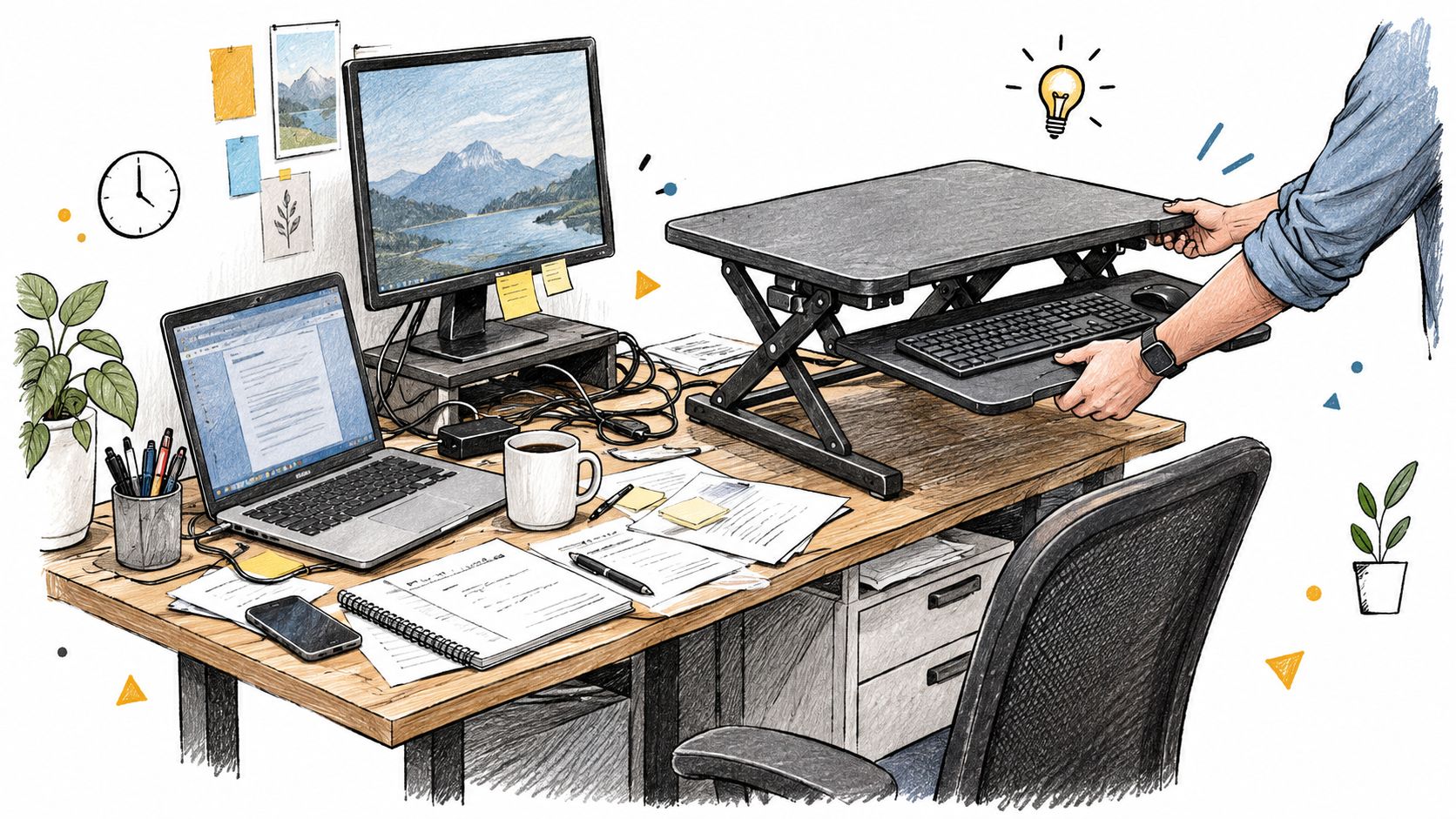
The practical reason I favour converters on small desks
I’d rather put a good converter on a tight desk than force a full desk replacement that doesn’t fit the room. On compact surfaces, the win isn’t dramatic transformation, it’s preserving what already works. Drawers stay. Shelving stays. Your chair, monitor, lamp, and cable routing don’t all need to be rebuilt from scratch.
Practical rule: if the desk footprint is already the limiting factor, judge the converter by how little of that footprint it steals, not by how tall it can go.
The Canadian evidence also argues against the “just stand more” sales pitch. The point is to interrupt sitting, not turn standing into a permanent default. A converter is useful precisely because it lets you alternate positions without giving up a small desk that still does the rest of your work well.
How Standing Desk Converters Actually Lift
A converter is just a different way to move your work surface. Some units keep everything on one raised platform, others separate the keyboard from the monitor, and a few behave more like an arm with a tray attached. The mechanism matters because it decides how much stability you get, how much space the unit steals, and whether your keyboard ends up where your elbows want it.
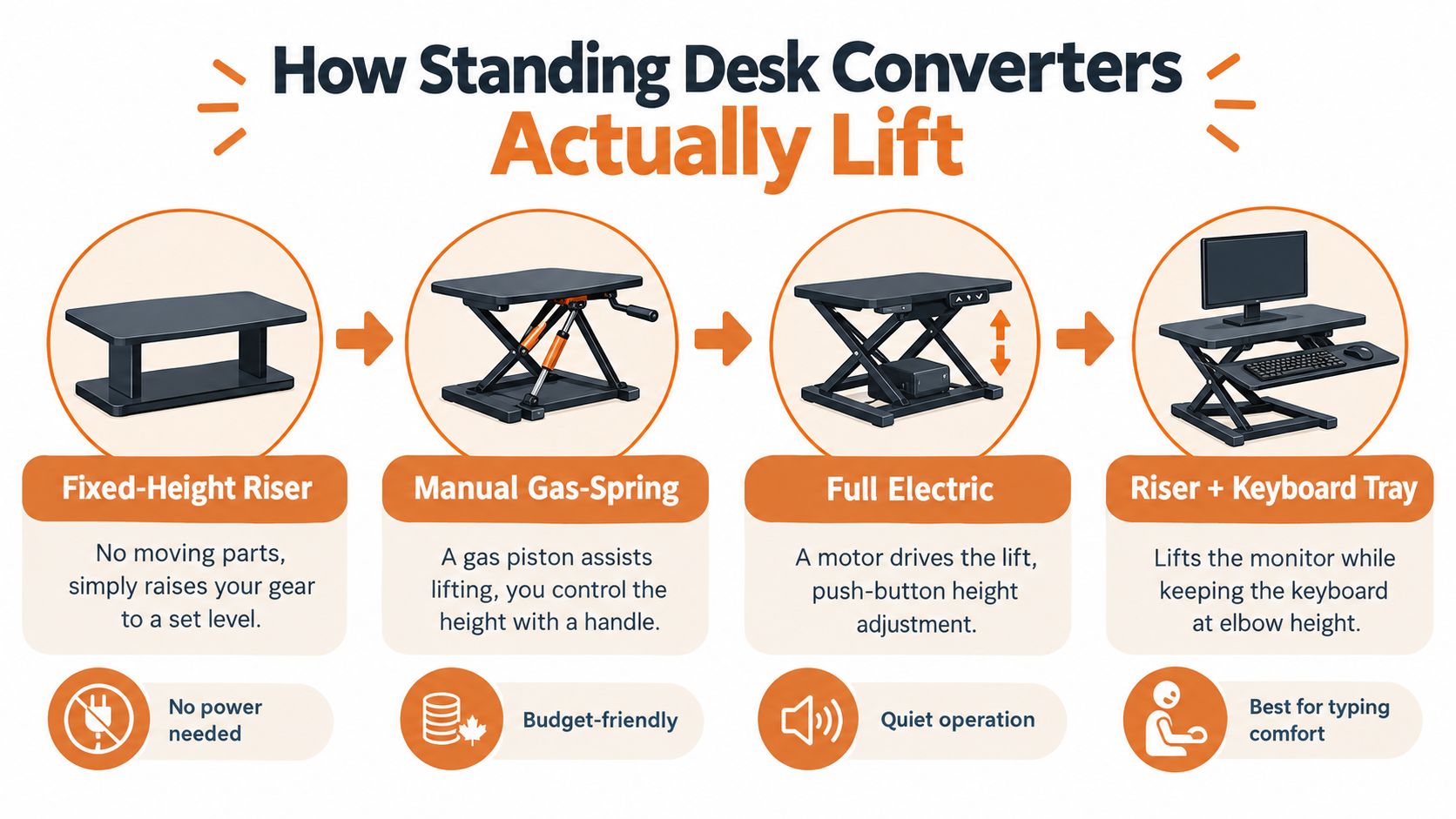
Four common mechanisms you’ll actually see
A fixed-height riser is the simplest model. It’s the book-on-blocks approach, a solid platform that gives you one height and no moving parts. It’s tidy, cheap-looking in a good way, and usually the most predictable option when you value stability over flexibility.
A manual gas-spring platform is the classic sit-stand converter shape. A lever releases the spring or piston, and the whole platform moves with assistance. Think scissor lift with help from a counterbalance, which is why these units often feel easier to use than they look.
A full electric unit swaps muscle for a motor. Push a button and the height changes without pulling a handle or shifting your weight. That convenience costs you more complexity and more hardware in the workspace, which matters on a shallow desk.
A riser-plus-keyboard-tray combo separates the typing surface from the screen more deliberately. That’s the cleaner setup when you want the monitor up high but still need the keyboard down near elbow height. In ergonomic terms, it’s the most useful structure for a serious desk user, not just someone testing the idea for a week.
What moves, and why that matters
The key question isn’t just how the unit lifts. It’s whether the keyboard and monitor move together, or whether one can be adjusted independently. A platform that only raises the screen can leave the keyboard too high for seated work, which is exactly the trap to avoid on a compact desk. A converter that keeps both surfaces well aligned is often the better long-term buy.
Stability and travel range behave very differently across these designs. Fixed risers are steady because they don’t move. Spring-assisted and electric units give you more adjustment, but they also introduce more parts, more force, and more chances for wobble if the desk underneath isn’t solid.
Stability and Height Tradeoffs That Matter
The stability story is easy to overcomplicate. At standing height, the question is not whether a converter moves at all, because most of them do. The question is whether the movement is tolerable at the monitor, distracting at the keyboard, or bad enough that you stop using it.
Where wobble shows up first
A fixed riser feels solid because it’s basically a platform. A gas-spring converter can feel smooth on the way up and still transmit the desk’s own flex once it’s raised. Electric models avoid the manual lifting strain, but they don’t magically erase the physical effort, especially if the monitor sits high and the keyboard tray extends forward.
The distinction between monitor sway and keyboard bounce is worth paying attention to. Monitor wobble is what you notice when the whole screen trembles a little as you type. Keyboard bounce is what you feel under your hands when the tray behaves like a diving board. Review videos often blur the two together, but your wrists will not.
A converter can only feel as stable as the desk it sits on. If the desk rocks, the converter will inherit that problem immediately.
The triangle you actually trade between
On small desks, you’re balancing stability, range, and footprint. Hold one of those too aggressively and one of the others suffers. A very compact unit may give up travel. A highly adjustable post-and-tray system may ask for more depth and more visual clutter. A broad platform may feel sturdy but dominate the desk.
That’s why height window matters so much. A converter can sound generous on paper and still miss your body once a monitor and keyboard are both in place. The test is whether it places your elbows and eyes where they need to be without forcing the desk deeper into the room than you can afford.
Quick comparison of the main types
| Mechanism | Lift Range | Standing Stability | Compact-Desk Footprint |
|---|---|---|---|
| Fixed-height riser | Limited | Excellent | Very good |
| Manual gas-spring platform | Moderate to broad | Good to variable | Good to moderate |
| Full electric unit | Broad | Good to variable | Moderate |
| Riser plus keyboard tray combo | Depends on design | Good when well built | Moderate to tight |
Footprint and Fit on a Small Desk
Small desks punish lazy buying. A converter that looks slim in photos can still swallow the last usable inch of depth once the keyboard tray extends forward and the back edge lands near the wall. On a compact workspace, geometry decides everything, and the converter has to earn its place.
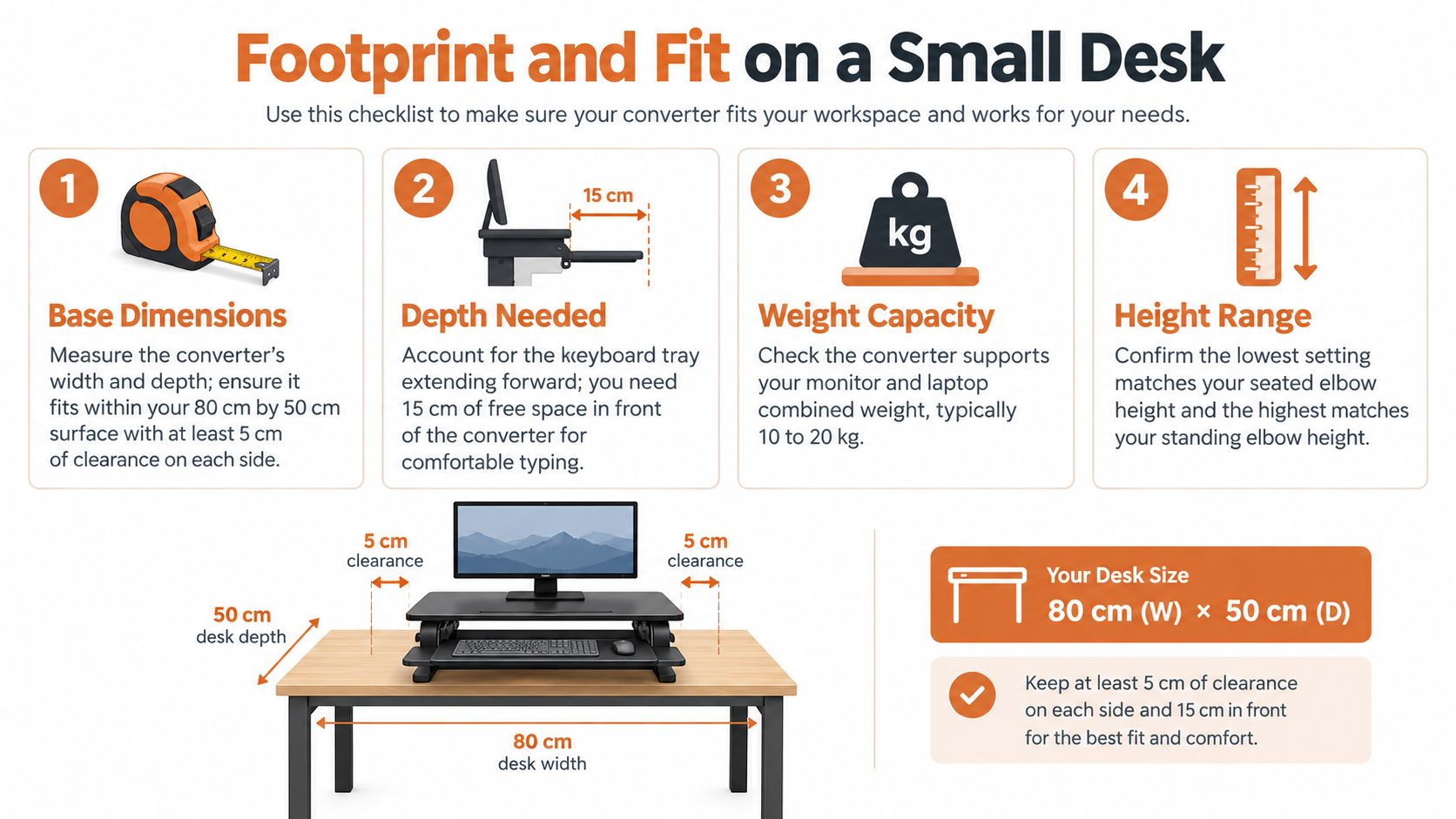
Measure the desk, then measure what the converter takes away
Start with the actual desk dimensions, front to back and side to side. Then check the converter’s base, not just the platform. A unit can match the width of a narrow desk and still fail if its depth leaves no room for a notebook, a drink, or the edge of a laptop when the platform is lowered.
The rear edge matters more than most buyers expect. If the converter’s back lip hits the monitor stand or the wall, the whole setup slides forward and steals task space. If the keyboard tray extends too far, your forearms end up hanging off the front edge of the desk, and that gets annoying quickly.
The fit questions I’d ask before buying
- Will the base sit fully on the desk? If that answer is shaky, skip it.
- Will the tray leave any real seated workspace? A converter that blocks the whole desk is too big for the room.
- Will the laptop still close or clear the rear edge when the unit is lowered? That is the fastest sanity check for cramped surfaces.
- Will the cables reach the raised position without tugging? Rising hardware needs slack, not hope.
Cable slack matters. Ontario guidance says cables and electrical access should not obstruct adjustment (Ontario computer ergonomics). If the converter rises and the USB-C or HDMI lead goes taut, the setup is wrong, even if it looks clean at desk level.
My blunt rule: if a converter eats so much depth that the desk stops feeling like a desk, it is the wrong converter for that room.
Ergonomic Setup and Adjustment
A standing desk converter only works when you set it in the right order. Start with your elbows, then the keyboard, then the screen. That sequence matters more than the mechanism or the brand.
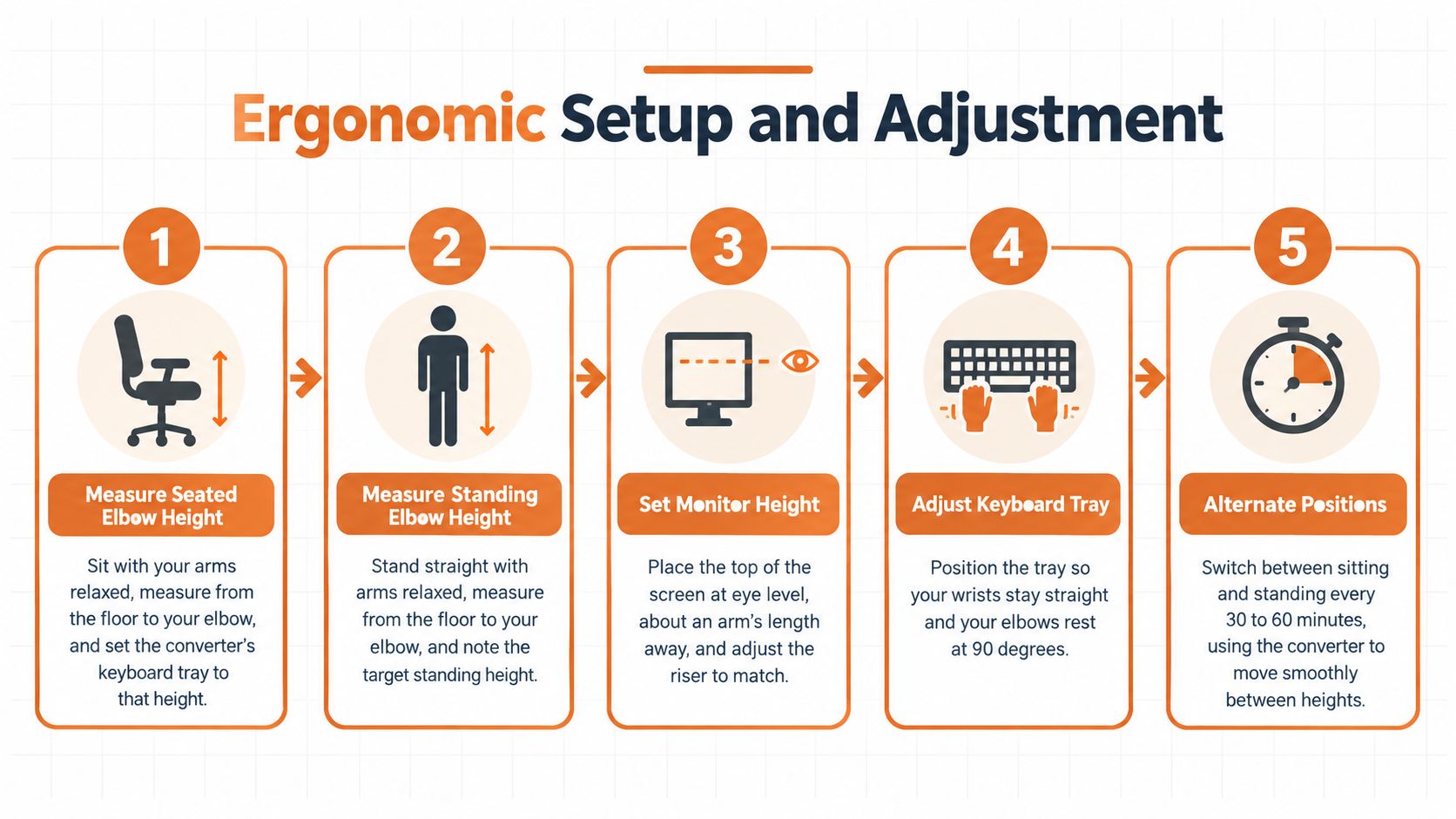
Set the keyboard first
Ontario guidance calls for relaxed shoulders, upper arms hanging vertically, elbows near 90 degrees, and straight wrists while typing. That means the keyboard belongs where your elbows naturally land, not where the platform happens to stop. If your shoulders creep upward, the tray is too high.
The Canadian Centre for Occupational Health and Safety places the keyboard at standing-elbow height and says the monitor should sit at eye level or slightly below (CCOHS sit-stand desk guidance). Use that as your baseline. If your wrists bend back, lower the keyboard. If your shoulders shrug, lower it again.
Then place the screen where your neck stays neutral
A laptop alone on a converter usually forces a bad compromise. The screen sits too low when the keyboard feels right, and the keyboard sits too high when the screen feels right. An external keyboard is close to mandatory, and an external monitor or laptop riser usually improves the setup fast.
CCOHS places the monitor’s viewing line between horizontal and 30 to 35 degrees below horizontal (CCOHS sit-stand desk guidance). In plain terms, the screen should be high enough to keep your neck calm, but not so high that you look up into it. On a small desk, the monitor and keyboard need to work as a pair, not as separate fixes.
Finish with cables and reach
Once the heights are right, check the cable slack at full lift. Ontario guidance says cables and electrical access should not block adjustment. If the cable bundle pulls the unit backward or tugs on a port when you raise the tray, reroute it before you use the setup.
That final check matters more on a tight desk, where a converter can look tidy but still fight you every time you move it. Stand, sit, and run through a full cycle. If you have to force your body into position, the setup is still wrong.
How Often to Stand and When to Sit
A converter is a position-change tool, and that is the right way to use it. Build your day around shifts, not a standing streak. The goal is to move often enough that your back, legs, and feet never get locked into one position for too long.
Don’t chase all-day standing
Canadian guidance points in the same direction: frequent changes beat long standing blocks. CCOHS recommends schedules that range from sitting for 1 hour and standing for 5 minutes to switching every 20 to 60 minutes. Ontario guidance says to change positions at least every 30 minutes and to limit standing to no more than four hours in an eight-hour workday.
That is the schedule to use on a small desk. Start with short standing bouts, then alternate. Five to 15 minutes at a time is a sensible starting point if you are new to a converter or your floor setup is plain.
Standing more is not automatically better. Frequent transitions, with sitting, standing, and brief movement all doing their part, usually work better than trying to stay upright for long stretches.
Use the workday by task, not by posture
Typing-heavy work and focused writing usually belong in a seated setup first. Video calls, reading, and lighter admin tasks are easier to handle standing for a while.
Ontario Public Services Health and Safety Association gives an example cycle of 20 minutes sitting, 8 minutes standing, and 2 minutes moving in each 30-minute block, and notes that research-supported sit-to-stand ratios range from 1:1 to 1:3. That is a useful guide for a converter because it treats standing as one part of the workday, not the whole point of the desk.
Use your body as the check. If your feet start aching, if you are hanging on one leg, or if your shoulders feel braced after a standing stretch, sit down. An anti-fatigue mat helps. Good footwear helps too. Keep the standing blocks short enough that you finish alert, not sore.
Choosing Your Converter and Avoiding First Week Mistakes
Buy for the desk you have, the monitor you use, and the amount of switching you’ll do. If you want to stand every 20 minutes, a fiddly converter will annoy you. If you only want to stand during calls, you can prioritise stability and footprint over speed.
The clean decision rubric
Look at four things before you spend money. First, desk depth. Second, monitor size and weight. Third, whether you already use an external keyboard and mouse. Fourth, how often you want to change position in a normal day.
Then check the first-week failure points. Wobble is often the desk, not the converter. Keyboards and mice drift uphill when the tray isn’t really level. Monitors lean back if the rear load is too heavy. Cables strain when there isn’t enough slack at the back of the tray.
What good looks like
A good compact-desk setup doesn’t waste motion. It lowers smoothly, rises without tugging the cables, and keeps the keyboard where your elbows want it. The desk still has enough room for a notebook, a drink, and a mouse pad, which is the test most product pages never mention.
If the converter passes that test, keep it. If it turns the desk into a crowded shelf with a standing feature attached, send it back.
If you’re still deciding between a converter, a better cable setup, or a more complete compact-desk refresh, visit Deskbound for practical guides built around small spaces and real work habits. You’ll find the same kind of blunt, space-conscious advice there, with setup ideas that fit apartments, studio desks, and the furniture you already own.